Notional orders are buy or sell orders based on specific dollar amounts rather than a specific number of shares. Notional orders will buy or sell equities and ETFs, including fractional shares, of the eligible symbols up to the exact dollar amount in the order entry.
To create a notional order:
- Open the order editor window for the symbol you want to trade.
- In the Qty column, click on the À icon until you see the dollar sign. Specify the target dollar amount.
- Select MARKET or LIMIT (see details below).
- Click Confirm and send.
In the order confirmation window, you will see an Estimated Quantity: this is the quantity of the shares estimated to be bought or sold based on the current market price. For sell orders, a Max Quantity will also be displayed: it is the maximum amount of shares you could sell for the specified dollar amount given the current market price.
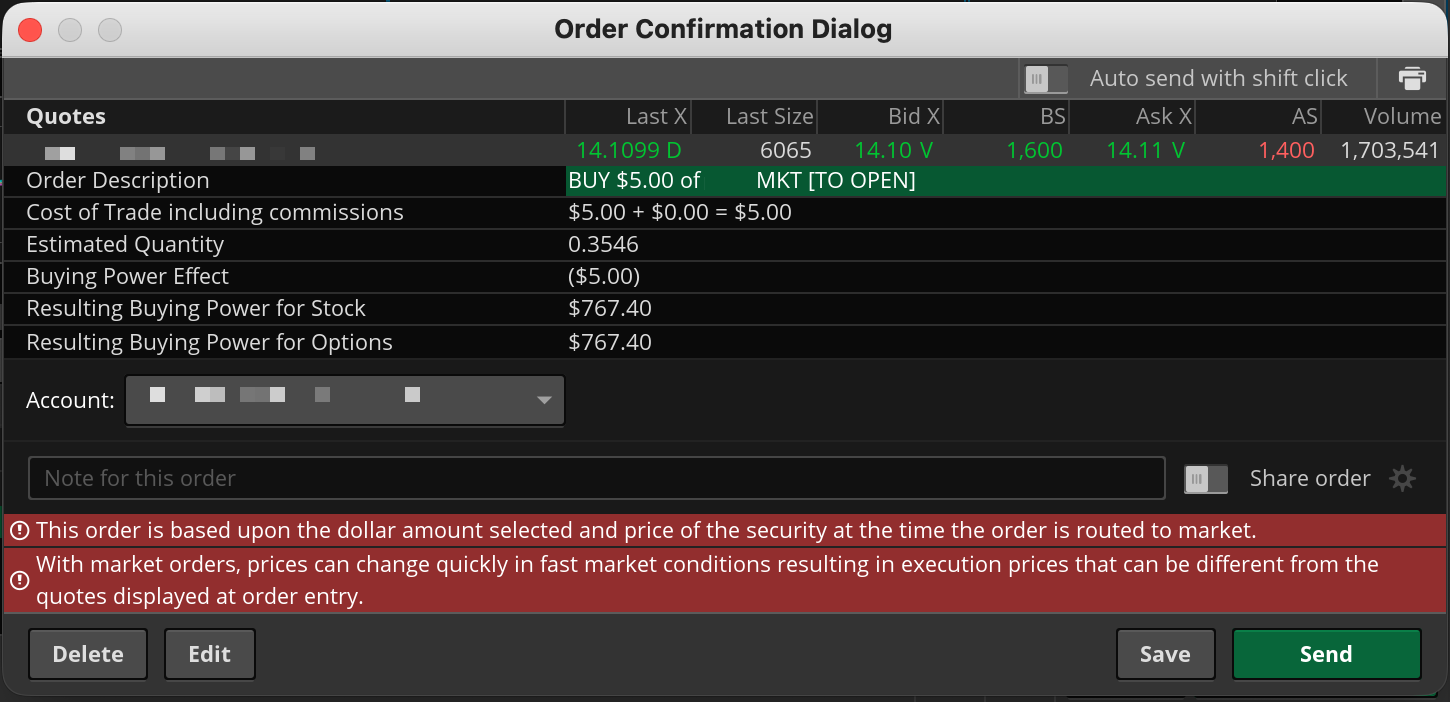
Because notional orders are dollar-based and not share-based, market volatility means there’s no guarantee an order will result in the same number of shares as the Estimated Quantity or the Max Quantity values.
Notional Orders and Fractional Shares
Copy link to the section
The minimum size for a fractional order is 0.0001 shares. Buy orders can have up to 4 decimal places, and sell orders can have up to 5 decimal places.
Notional orders need to be at least $1.00 for buy orders and at least $0.01 for sell orders. Note that to trade fractional shares with notional orders, the order type should be MARKET. If you use a LIMIT type notional order, the amount of shares you buy or sell will be rounded to the nearest whole number, and you cannot buy less than one share.